Get the app
Download Studio for Windows or Mac. Windows: run the installer and open it from the Start menu. Mac: unzip, drag StreamChum Studio.app into Applications. Apple Silicon, macOS 13.3+.
Cutting-edge streaming software for Windows and Apple Silicon. Create a custom look in seconds, orchestrate the whole stream from the same login, and much, much more.
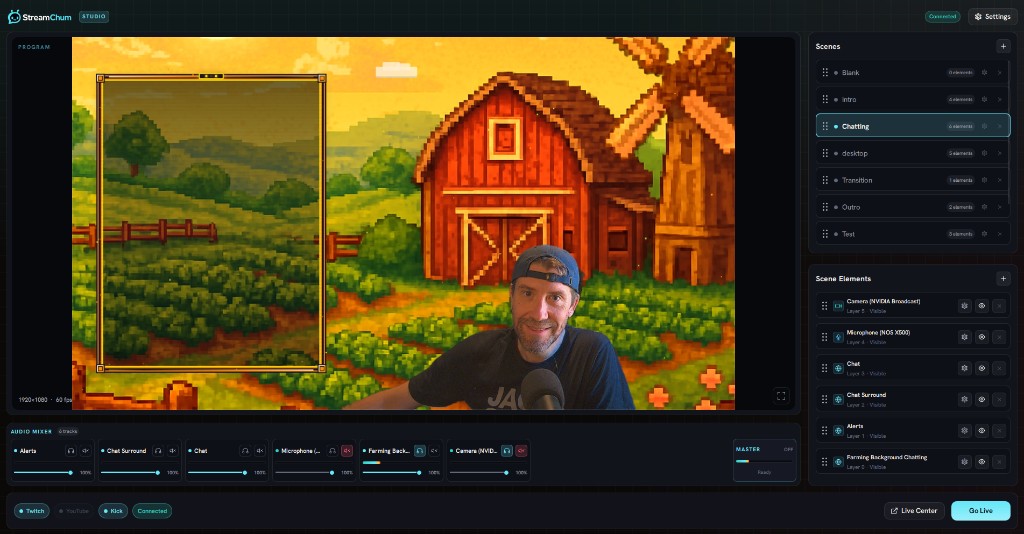
Download Studio for Windows or Mac. Windows: run the installer and open it from the Start menu. Mac: unzip, drag StreamChum Studio.app into Applications. Apple Silicon, macOS 13.3+.
Use the StreamChum account you already have. Your channels come with you, nothing to re-wire.
Your scene, your overlays, go live. Chat and Live Center stay right where you left them. Or hit Record to save an FLV on this computer instead.
Record writes an FLV of one layout on this computer. Studio asks whether that file should be the full screen layout or the mobile one. You do not need a channel turned on. When you stop, Studio shows the file name, the size, and the path.
Windows saves to Videos/StreamChum. Mac saves to Movies/StreamChum. The next recording does not replace the last one. Change the folder in Settings, Output.
The file is an FLV, not an MP4. Show in folder is on the dialog that appears when you stop. Copy path puts the location on the clipboard.
Stop the stream before you record. Stop the recording before you go live. Studio does not do both at once.
The AI pane is a chat. You describe gameplay, a starting-soon screen, or a BRB. Studio looks at the displays and cameras on the PC, plus the overlays you already have, and puts them on the canvas. You get a checklist first. Uncheck anything you do not want. Scene turns spend creative AI credits on a paid plan.
A full-canvas graphic, a timer, a looping bed if you asked for one.
Capture, webcam, and the overlays you already branded, placed from a sentence.
A hold screen that matches the pack, not a leftover from last month.
A Studio profile is the layout, the overlays, and the theme, not just the bitrate. Create one in the header, lock a theme from a name, a vibe, or a picture, and that look card sits next to Go live. Ranked and Just Chatting stop sharing leftover overlays.
A vibe, optional Look / Logo / Character pictures, or a pack you already have.
Saturday ranked does not dump Friday's Just Chatting overlays onto the canvas.
New scenes pick up that theme instead of inventing a second pack mid-plan.
Dual format streaming is in Studio. Desktop keeps the wide program. A phone held upright gets a layout you built for it, not a crop of the 16:9. YouTube and Kick stay on the horizontal encode.
Full screen is the layout you already had. Game, camera, overlays, same as before.
Switch the stage to Mobile. Each layout has its own elements, so the game can sit bigger and a webcam does not eat half the frame.
The checkbox is on the go-live sheet, off by default, when Twitch is a destination. If this computer cannot send both, the option stays off and says why.
Turn transcription on for the mic you already talk into. Put the words on the stream as live captions, or fire an overlay when you swear, say hello, or shout let's go. You describe the bit. Studio plays it.
Rolling words under the game. Muted phones, noisy rooms, and the VOD still get the callout.
Ask Element Builder for a giant 🤬, a hello wave, clutch confetti. Same look as the rest of your pack.
Switch a scene, poke another overlay, post to Discord. Same keyword, no hotkey.
Toggle Twitch, YouTube, and Kick in StreamChum. Studio takes you live to all of them.
Drop in the elements you already branded. Chat, alerts, and goals sit on the layout with the game and camera.
Live Center, Actions, and chat keep running while Studio carries the stream. Everything in one place.
The Twitch app on Xbox is still how you go live. Connect that channel and Live Center on a phone is chat, timeouts, automod, and briefs. HDMI into Studio is later, if you want overlays on the picture.
PS5 goes live to Twitch or YouTube. Connect that channel and run Live Center from a phone. HDMI plus Studio is later, if you want Kick, a webcam, and a layout you own.
Sign up, connect the channel that is actually live, keep broadcasting. Live Center is the product tonight. Capture card and Studio wait until you want the picture too.
Cutting-edge new streaming software. Orchestrate across all channels, including Discord. Create custom looks in seconds, and much, much more.
 Studio AI · Gameplay